
 UGC Infra
Google Play ASO Optimization: Boost Installs with Winning ASO Tactics
google play aso optimization: Learn proven tactics to boost visibility, keywords, creatives, and downloads.
So, you've built an app. Now comes the hard part: getting it discovered. That's where Google Play ASO (App Store Optimization) comes in, and it's less of a "nice-to-have" and more of a "do-or-die" for most founders.
At its core, ASO is how you make your app more visible and appealing in the Google Play Store. It is a mix of art and science. You optimize everything from your app’s title and description to its screenshots, all with the goal of driving more organic downloads. For founders, nailing your ASO strategy is the bedrock of sustainable growth.
Building Your Foundation for Google Play Success
Let's be real: launching your app is just the first step. The Google Play Store is a sprawling, incredibly crowded marketplace. Just showing up isn't enough. You need a methodical, deliberate ASO plan to cut through the noise and avoid getting buried.
Think of ASO as the engine for your app's discovery. It is not a set-it-and-forget-it task; it's a living, breathing cycle of research, action, and testing. When you successfully align your store listing with what people are actually searching for, you build a superhighway for users who genuinely need your app to find and install it.
Why You Can't Afford to Ignore ASO
The numbers alone tell the story. The Google Play Store is massive and getting bigger every day. Projections show global downloads hitting a staggering 143 billion by 2026, up from 111 billion in 2021.
Right now, you're competing with over 2.06 million other apps, and about 52,000 new ones join the fray every single month. A solid ASO strategy is what separates the apps that thrive from those that just exist. It’s how you connect your solution with the people searching for it, right when they're ready to download.
The Core Pillars of a Winning ASO Strategy
A killer ASO plan doesn't just happen. It's built on a few fundamental pillars that all work together. Get these right, and you'll create a system that consistently pulls in new users. Some of these elements help you rank higher in search, while others are all about convincing people to hit that "Install" button.
A winning ASO strategy is a blend of keyword intelligence, compelling visuals, and genuine app quality. Understanding how these pillars interact is crucial for building a process that delivers results.
Core Pillars of Google Play ASO
By mastering these pillars, you create a powerful flywheel. Better visibility leads to more downloads, which in turn generate the positive user signals Google loves, further boosting your visibility.
I see so many founders get obsessed with keywords and completely forget about the user experience. Google's algorithm is smart. It knows if an app gets a ton of downloads but can't keep users around. A holistic strategy has to address both discovery and delight.
Ultimately, a strong organic presence seriously lowers your user acquisition costs. When people find you naturally, you're less reliant on expensive ad campaigns. To get the full picture of how ASO fits into a larger growth framework, check out this guide on mobile app user acquisition.
Mastering Keywords and Metadata for Discovery
Getting found on Google Play all boils down to one simple truth: you have to understand how real people search for an app like yours. Forget about old-school tactics like keyword stuffing. A smart Google Play ASO optimization strategy today is all about digging into user intent and then carefully aligning your app’s metadata to match it.
This isn't just about guessing what people type into the search bar. It's a methodical process of finding keywords with real potential, seeing what’s working for your competitors, and then weaving those terms into compelling copy that clicks with both Google’s algorithm and actual humans.
Uncovering High-Opportunity Keywords
Your first move is to build what’s called a "semantic core". This is basically a master list of all the keywords that define your app's purpose and features. Start by just brainstorming. Think about the problems your app solves, its standout features, and who you built it for. Get everything down on paper.
Next, you'll want to expand that initial list using dedicated ASO tools. These platforms are invaluable for uncovering search volume, checking out the competition, and finding related keywords you probably missed. The real goal here is to find that sweet spot between high traffic and achievable difficulty. Sure, a keyword with 10,000 monthly searches looks great, but if it's completely dominated by huge brands, it's not a realistic target for a new app.
Don’t forget to hunt for long-tail keywords. These are longer, more specific phrases that, while having lower search volume, often have much higher conversion rates because the user intent is so clear. For example, instead of just targeting "fitness app," you'll have better luck with a phrase like "at-home HIIT workouts for beginners."
Writing a Title That Ranks and Converts
Your app title is, without a doubt, the single most powerful piece of metadata you have for keyword rankings. You’ve only got 30 characters to work with, so every single one has to pull its weight.
The proven formula is simple: combine your brand name with your most important keyword.
Think Brand Name + Primary Keyword or Primary Keyword by Brand Name.
So, for a meditation app, instead of just "Calmwave," a much stronger title would be "Calmwave: Sleep & Meditation." This one-two punch immediately tells users what the app does while hitting those critical search terms.
Crafting the Perfect Short Description
The short description is your 80-character elevator pitch. It’s one of the first things people see on your store listing, and crucially, it's an indexed field. That means the keywords you put here directly impact your search visibility.
Think of the short description as the bridge between discovery and conversion. It needs to be packed with relevant keywords for the algorithm but also be persuasive enough to make a user want to learn more.
This isn’t the place for vague marketing slogans. You need a clear, benefit-driven statement. A photo editing app using "AI photo editor with professional filters, effects, and collage maker" is going to perform far better than one that just says "The best app for your photos."
Building a Compelling Long Description
With up to 4,000 characters, the long description is where you can finally tell your app's full story. While most users won't read it from top to bottom, Google’s algorithm absolutely will. This is your chance to strategically work in a wider range of secondary and long-tail keywords.
The key to a great long description is structure. Use smart formatting to make it scannable.
- HTML Tags: Don't be afraid to use
<b>,<h2>, and<h3>tags. They break up the text and help emphasize important features, and keywords placed inside these tags might just get a little extra ranking juice. - Bullet Points & Emojis: Lists using bullet points or relevant emojis (like ✅ or 💡) are your best friend. They make your app's benefits pop and are much easier to read on a small screen.
- Natural Language: Above all, write for people. The text should flow well and sound persuasive. Keyword density is still a factor, but a good rule of thumb is to mention a primary keyword about once every 250 characters to avoid sounding robotic or spammy.
This is also where semantic search really comes into play. Google's algorithms have come a long way from simple keyword matching. They now use sophisticated AI to understand topics and user intent on a much deeper level. This means your app can rank for related terms even if you don't mention them explicitly. You can get a deeper dive into Google's algorithmic shift on platforms like asolytics.pro.
Optimizing Creative Assets to Drive Downloads
Getting someone to your app’s store page is a huge win, but that's only half the battle. Now you have to convince them to actually tap "Install." This is where your creative assets become the star of your google play aso optimization efforts. Your app's visual storefront is a powerful tool.
Your icon, screenshots, and promo video are your most powerful conversion tools. They communicate what your app is all about in seconds, long before anyone reads your carefully written description. People make download decisions in a flash, so visual appeal isn't just nice to have; it's everything. Neglecting your creatives is like hiding a brilliant product in a beat-up, generic box. People will just walk right past it.
Designing an Icon That Demands Attention
Your app icon is the very first thing people see. It’s in search results, category lists, and right there on their home screen after they download. It has to be instantly recognizable, memorable, and stand out in a ridiculously crowded field. A weak icon can make even the most incredible app feel amateurish or untrustworthy.
Think of your icon as your app's face. Keep it simple. Avoid cramming in text or complex designs that turn into a blurry mess at small sizes. Go for a bold, clean look with contrasting colors that pop on both light and dark wallpapers. Seriously, pull up the store and look at it next to your top competitors. Does it blend in or stand out?
Your icon is your app's silent salesperson. It works 24/7 in search results and category lists. A simple, bold, and unique design is non-negotiable for anyone serious about ASO.
Crafting High-Impact Screenshots and Feature Graphics
Once a user clicks into your listing, your screenshots are their first real look inside. This is your chance to tell a visual story. Don't just dump a few random screens from your app and call it a day. You need to curate a narrative that walks people through the absolute best features and benefits.
The first one to three screenshots are gold because they’re visible above the fold. Use this prime real estate to show off your app’s "aha!" moment. Then, overlay each image with short, punchy captions to explain the value they're seeing.
Here's how to get it right:
- Tell a Story: Arrange screenshots in a logical flow. Show the problem, then present your app as the solution.
- Focus on Benefits, Not Just Features: Instead of a caption that says "Task List," try something like "Organize Your Entire Day in Seconds." See the difference?
- Use Bold Captions: Short text in a big, easy-to-read font helps users get the point instantly.
- Choose the Right Orientation: For games or immersive apps, landscape screenshots often work best. For most utility and lifestyle apps, portrait just feels more natural on a phone.
When you create a visually compelling and informative gallery, you help people picture themselves using your app successfully. That's a powerful push toward hitting the download button. Authentic visuals can be a game-changer here, and if you need help, our guide on how to find UGC creators has some great tips. https://adworkly.co/blog/how-to-find-ugc-creators
Creating a Promo Video That Converts
A promo video is your ultimate conversion weapon. It brings your app to life in a way static images just can't. You can show the user experience, highlight dynamic features, and build an emotional connection. When you're trying to drive downloads, a compelling App Demo Video can do the heavy lifting by showing your app in action right on the store page.
You don’t need a Hollywood budget, but your video does need to be effective. The first 5-10 seconds are absolutely critical to hook viewers before they scroll on. Start with the single most exciting or valuable thing your app does.
Keep it short and sweet. A length of 30 to 60 seconds is the sweet spot. Focus on action. Show, don't just tell. Use quick cuts, engaging music, and on-screen text to spell out the key benefits. And remember, most people watch videos with the sound off, so make sure it's just as powerful without audio. A great video gives users the confidence that your app will deliver on its promises, which can send your conversion rates soaring.
Using User Signals and App Quality for Higher Rankings
Keywords and creatives will get you noticed, but what keeps you at the top of the rankings is something you can't just edit in your Play Console: user satisfaction. Google's algorithm heavily favors apps that people actually enjoy and stick with. Think of it this way. Google’s job is to recommend the best apps, and the strongest proof of quality comes directly from user behavior.
This is where building a high-quality app becomes one of the most powerful and defensible ASO strategies you can have. When you deliver a stable, valuable, and enjoyable experience, you naturally generate the positive signals that Google’s algorithm loves. It creates a powerful feedback loop: a great app leads to better visibility, which brings in more users who then reinforce those positive signals.
The Power of Ratings and Reviews
Let's be blunt: your app's star rating is one of the first things a potential user sees, and it's a massive factor in their decision to download. It's instant social proof. A high rating builds trust, while a low one is a serious red flag that can kill a download before it even happens.
The impact on your ranking is just as significant. The good news? There's a huge opportunity here for founders who care. Out of over 1.58 million active apps on the store, only around 234,000 manage to hit a 4.0-star rating or better. That means more than 85% of apps fall short of this key benchmark. You can find more details in these Google Play Store statistics on appinventiv.com. Simply by focusing on user satisfaction, you can leapfrog a huge portion of the competition.
Your user feedback is a goldmine. Every single review, good or bad, is a direct line to what your users are thinking. Treat it like free, continuous market research that can, and should, guide your entire product roadmap.
Don't just collect reviews; engage with them. Responding shows everyone, including potential new users, that you’re listening and committed to making things better. A thoughtful, helpful reply to a negative review can sometimes even convince a user to change their rating. It's a crucial part of managing your app's reputation. If you're looking for a more in-depth strategy, check out our guide on how to get customer reviews.
Improving App Stability and Performance
Technical performance isn't just a developer problem; it's a core ASO issue. An app that constantly crashes, freezes, or eats up battery life is going to get uninstalled. Fast. These are powerful negative signals that tell the algorithm your app delivers a poor user experience, and your rankings will suffer for it.
You absolutely have to keep a close eye on the Android vitals dashboard in your Google Play Console. Pay special attention to:
- ANR Rate (Application Not Responding): This is the ultimate frustration for a user. An unresponsive app is an almost guaranteed uninstall.
- Crash Rate: Nothing says "bad quality" like an app that just closes on its own. A high crash rate is a poison pill for your ASO.
- Slow Rendering: Laggy screens and stuttering animations make your app feel cheap and clunky. It ruins the user experience.
Make monitoring these metrics a non-negotiable part of your workflow. Set up alerts, get ahead of problems, and make bug fixes a top priority. A stable, reliable app is the foundation for good retention and all the positive engagement signals that Google rewards.
Positive vs. Negative User Signals
Understanding the signals your app sends to Google is crucial. Some behaviors tell the algorithm that users love your app, while others are clear red flags. Here's a quick breakdown of what helps and what hurts.
Ultimately, your goal is to maximize the positive indicators by focusing on a quality user experience and actively minimize the negative ones by staying on top of technical performance and user feedback.
Boosting Retention and Engagement Signals
Finally, Google watches what happens after the install. If users are uninstalling your app within minutes or hours of downloading it, that’s a massive red flag that you didn't deliver on your promise. On the flip side, strong retention and deep engagement are clear signs you’ve built something people find valuable.
The key metrics here are pretty straightforward:
- Retention Rate: What percentage of users come back after 1 day? 7 days? 30 days?
- Session Length: How long are people actually spending in your app when they open it?
- Active Users (DAU/MAU): How big is your core, engaged user base?
Improving these numbers always comes back to the same thing: delivering real value. Nail your onboarding flow, give users a reason to come back, and consistently make your app better. When you build a high-quality, stable, and genuinely useful app, you're giving the algorithm everything it needs to push you to the top.
Your ASO Is Never "Done": Building a Continuous Testing Roadmap
Think of your Google Play Store listing less like a static brochure and more like a living, breathing part of your product. If you just set it and forget it, you're leaving growth on the table. The apps that consistently climb the ranks are the ones that are always testing, always learning, and always iterating. This is where a continuous testing roadmap comes in. It is the engine that powers sustainable ASO growth.
The whole idea is to stop guessing and start measuring. You might think a new icon looks better, but only data can tell you if it actually drives more downloads. Luckily, Google gives you the perfect sandbox for this right inside the Play Console.
Getting Smart with Google Play Store Listing Experiments
Google Play's built-in A/B testing tool, Store Listing Experiments, is your secret weapon for methodical optimization. It lets you serve up different versions of your store listing to a slice of your real audience and see which one performs best. No guesswork, just hard data.
You can run experiments on nearly every critical "first impression" asset:
- App Icon: Does a vibrant color beat a minimalist design? Does a character-based icon outperform an abstract one? Test it.
- Screenshots: Try reordering them to lead with your most compelling feature. Experiment with different background colors, fonts, or call-to-action styles.
- Promo Video: Pit your current video against a shorter, punchier version. You can even test having a video versus just using screenshots to see the impact.
- Short Description: This is prime real estate. Test different value props and keyword combinations to see what hooks users and makes them tap "Install."
This whole process feeds into a powerful growth loop. When your store listing is dialed in, it creates positive user signals that tell Google's algorithm your app is a winner.
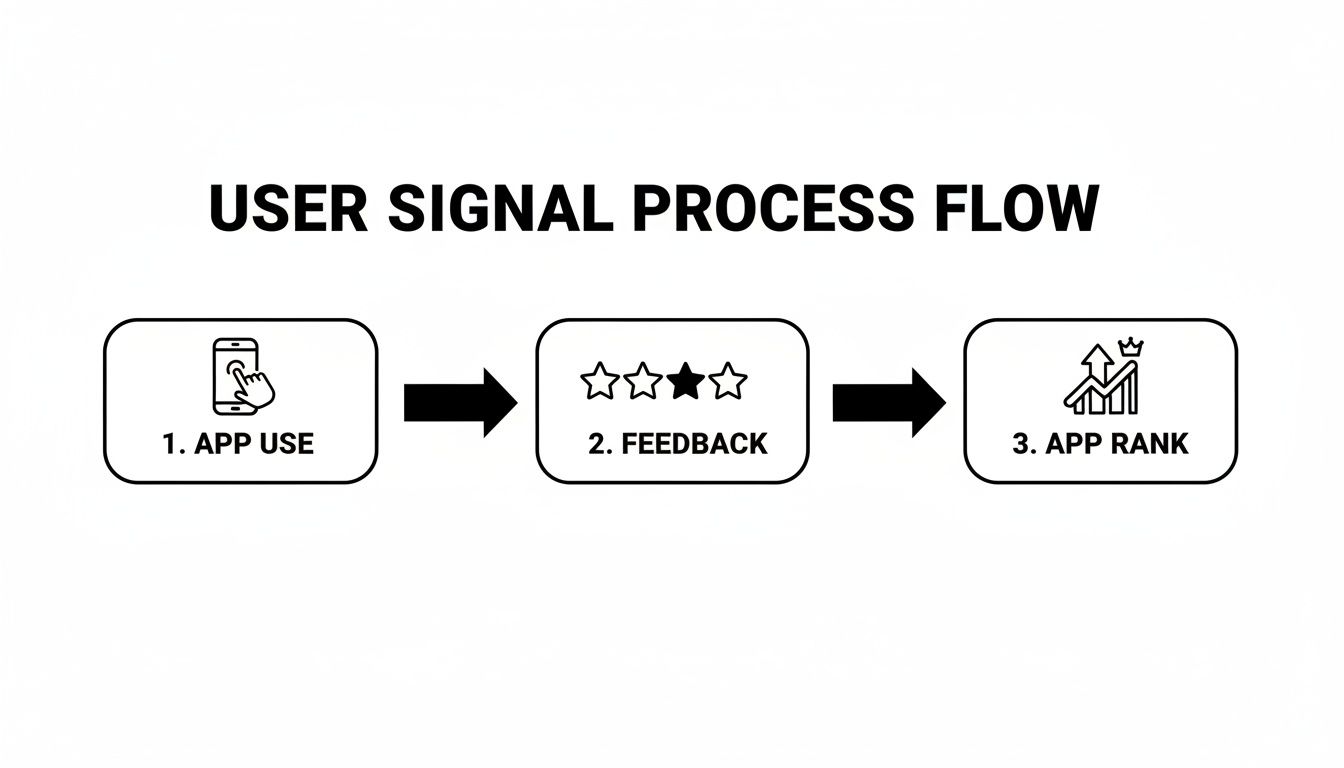
A better app experience and a more compelling store page lead to positive feedback and more installs, which directly boosts your app's ranking. It's a beautiful cycle.
How to Run Experiments That Actually Work
Just throwing random changes at the wall won't get you far. You need a simple, repeatable framework to make sure your experiments are meaningful.
- Start with a Hypothesis: Every good test begins with an educated guess. For example: "I believe changing our icon from dark blue to bright orange will increase installs by 5% because it will stand out more in a crowded search results page." This gives your test a clear purpose.
- Pick Your Battles (Prioritize): You can't test everything at once. Focus on the big-ticket items first. A new icon or a completely redesigned set of screenshots will almost always have a bigger impact than a tiny wording change in your long description.
- Dig into the Results: Google will tell you which version won and how confident it is in the result. Don't just glance at the top-line number; look at both first-time installers and retained installers to get a clearer picture of user quality.
- Implement or Iterate: If you have a clear winner, awesome! Roll it out to 100% of your users. If the results are flat or inconclusive, don't see it as a failure. Use what you learned to form a smarter hypothesis for the next test.
If you want to get more advanced and test multiple changes at once, exploring some multivariate ad testing tools can provide a more sophisticated framework for your experiments.
Don't Forget to Go Global: The Power of Localization
A one-size-fits-all store listing is a surefire way to cap your growth. As you expand, localization becomes non-negotiable. And I'm not just talking about running your text through a translator. This is about genuine cultural adaptation.
This means rethinking your metadata (title, descriptions) and your creative assets for every single market. A clever pun in English might fall completely flat in Japanese. A color that’s appealing in the US could have a negative connotation in Brazil.
Don't just translate, transcreate. A literal translation can sound clunky and kill your credibility. The goal is to work with native speakers to capture the spirit and intent of your message, making it feel perfectly natural and compelling to local users.
Your localization checklist should always include:
- Fresh Keyword Research: How people search for an app like yours can vary wildly from one country to another. You need to do the keyword research from scratch for each language.
- Cultural Vetting: Take a hard look at your icon, screenshots, and even your app's color scheme. Are there any symbols, gestures, or images that could be misinterpreted or off-putting in a different culture?
- Local Competitor Analysis: See what the top apps in your category are doing in Germany, South Korea, or Mexico. This will give you invaluable clues about local ASO trends and user expectations.
By building a rhythm of continuous testing and embracing true localization, you create a sustainable system for growth. Each experiment makes you smarter, and each new market you properly enter unlocks a fresh audience, keeping your app competitive and discoverable across the globe.
Got Questions About Google Play ASO? We’ve Got Answers.
Even with the best playbook, you're bound to run into some specific questions when you're in the trenches with your Google Play ASO. I get asked these all the time by founders and marketing teams. Let's clear up some of the most common hurdles.
Think of this as a quick chat with an expert to help you navigate those tricky spots and make smarter, data-backed moves for your app.
How Often Should I Be Updating My App's Metadata?
This is a big one, and the honest answer is: it depends. There’s no magic schedule. A good rule of thumb is to take a hard look at your keyword performance and what your competitors are doing at least once a quarter. Don't make huge changes on a whim. Big updates should only come after you've spotted a juicy new keyword opportunity or have a clear winner from an A/B test.
Feel free to make small tweaks to your long description more often. It's a great place to test new messaging. But be careful with your app title and short description. Changing those too frequently can kill your ranking momentum and confuse people who are trying to find you again. The name of the game is being data-driven, not just reacting to every little trend.
Do My Paid Ad Campaigns Actually Help My ASO?
Yes, they do, but it’s an indirect relationship. Running a Google Ads campaign won't magically boost your organic search rank for a keyword. But what it does do is drive a ton of downloads in a short period. That spike in download velocity is a massive positive signal to the Play Store's algorithm. Suddenly, you might start showing up in top charts or "similar apps" sections, which is fantastic for visibility.
Plus, more users means more chances to get ratings and reviews, and those are direct ASO ranking factors. Think of paid campaigns as an accelerator. They help you quickly gather the positive user signals that your organic ASO strategy is built to capitalize on.
What’s the Single Most Important Factor for Google Play ASO?
If I had to pick just one, it’s the app title. It carries the most weight for keyword rankings. A well-crafted title that nails your main keyword while clearly explaining what your app does can give you a serious, almost immediate boost in discoverability. That said, even the best title in the world can't save an app with terrible ratings or screenshots that look like they were made in Microsoft Paint.
The truth is, a holistic strategy always wins. You need a perfect blend of strong keywords in your metadata, creatives that convert, and the crucial quality signals that only come from a stable app that people genuinely love. No single element can carry the weight of your success alone.
How Long Until I Actually See ASO Results?
Patience is key here, but the timeline really varies. Sometimes, a simple change to your app title or short description can move the needle on keyword rankings in as little as a week. On the other hand, a much bigger goal, like pulling your average rating up from a 3.5 to a 4.2, is a long-term project. That takes a serious commitment to improving your product and managing user feedback.
If you’re running continuous A/B tests on your screenshots or icon, you might see small, incremental lifts in your conversion rate within a few weeks. The best way to think about ASO is not as a quick fix, but as an ongoing investment in your app's future. The consistent effort you put in today will compound over time, building a rock-solid foundation for organic growth.
Ready to stop guessing and start growing? The team at Adworkly combines expert strategy with AI-powered execution to build scalable user acquisition systems for mobile apps. Let us help you master your Google Play ASO and drive the downloads your app deserves. Learn more at adworkly.co.