
 UGC Infra
facebook/ads/library: See Competitors & Ad Transparency
facebook/ads/library: Learn to use the tool for competitor analysis, ad inspiration, and transparent advertising - your complete guide to smarter marketing.
Ever wonder what ads your competitors are running on Facebook and Instagram? There’s a free tool that lets you see exactly that. It’s called the Facebook Ads Library, and it's a publicly searchable database of every active ad across Meta's platforms. While it started as a way to create transparency in political advertising, it has quickly become a goldmine for marketers looking for competitor insights and creative inspiration.
What Is the Facebook Ads Library?
Think of it as a public library, but instead of books, it's filled with every single ad currently running on Facebook, Instagram, Messenger, and the Audience Network. It’s a powerful, completely free tool from Meta that pulls back the curtain on the world of digital advertising.
It first launched back in 2019 to shed light on political ads, but its purpose has grown massively since then. Today, marketers and advertisers all over the world use it for everything from competitive intelligence to sparking new campaign ideas. It allows anyone, from a seasoned pro to a curious observer, to look up ads run by any brand. You can see when an ad started running, the different versions of it, and where it's being shown. To dig deeper into how this tool is reshaping marketing, check out the insights on foreplay.co.
A Look at the Main Interface
This isn't just a gallery of ads; it's a strategic weapon. Using it correctly can give you a serious competitive advantage, help you brainstorm fresh ideas, and let you make smarter, more data-driven decisions about your own ad spend and creative strategy.
Think of it as a digital microscope for advertising. It lets you zoom in on your competitors' exact strategies, revealing their messaging, creative choices, and how they’re trying to engage people, all in real time.
This guide will walk you through everything you need to know, from the basics of searching to more advanced analysis techniques. You'll learn how to turn this massive database of ads into real, actionable insights for your business.
The image below shows the simple, clean search interface you’ll see when you land on the page.
As you can see, it's pretty straightforward. You just need to select a location and an ad category, then type in a keyword or the name of an advertiser to get started.
Key Benefits for Marketers
For any business, the Ads Library is a game-changer. It gives everyone access to the kind of competitive intel that used to be incredibly expensive or hard to find.
Here are a few of the biggest perks:
- Competitive Analysis: Get a direct look at your competitors' ad campaigns. You can see their messaging, the offers they’re pushing, and the images or videos they’re using. It’s like getting a copy of their playbook.
- Creative Inspiration: Feeling stuck? Browse thousands of ads in your niche (and outside of it) to get the creative juices flowing. You can spot what's trending, find effective visuals, and see what kind of ad copy is getting attention.
- Market Research: Get a feel for how different brands are positioning themselves. You can also analyze how ad strategies change from one country to another by filtering your searches by location.
How to Navigate the Ads Library Interface
Jumping into a new tool for the first time can feel a little disorienting, like trying to find your way around a new city without a map. Thankfully, the Facebook Ads Library is pretty straightforward once you get the lay of the land.
Let's walk through the main interface so you can get your bearings and start your research with confidence.
The dashboard is clean and simple by design. Its whole purpose is to get you to the ads you want to see with as few clicks as possible. You'll really only interact with three core components to get started.
Choosing Your Geographic Location
First things first, you need to set your location. This simple dropdown menu is more powerful than it looks. It lets you see exactly how brands change their advertising from one country to another, which is a goldmine for understanding regional marketing strategies.
For example, a global brand like Nike might run ads featuring basketball in the United States but focus on cricket in India. A quick location switch can reveal these market-specific campaigns. Always start here by picking the country that’s most relevant to your research.
Selecting the Right Ad Category
Next up, you have to choose an ad category. The Ads Library splits everything into two main buckets: general commercial ads and ads with a social or political angle.
- All Ads: This is your default setting and the one you'll use 99% of the time as a marketer. It covers everything from e-commerce promotions and local service ads to huge brand awareness campaigns.
- Issues, Elections or Politics: This category was built for transparency around sensitive topics. It includes extra data like ad spend and audience demographics, details you won't find on regular commercial ads.
For spying on competitors or just looking for creative inspiration, you'll almost always want to stick with "All Ads". This keeps your search focused on the commercial content that actually matters to your business.
Think of your location and category selections as the foundation for your search. Getting these two things right from the get-go ensures you're not digging through irrelevant ads and helps you zero in on what your competitors are doing.
Using the Keyword and Brand Search Bar
This search bar is where the real magic happens. You can search in two main ways: by an advertiser's name or by a specific keyword. Knowing when to use each is the key to getting the results you want.
1. Searching by Advertiser (Brand Name) If you have a specific competitor in mind, just start typing their official Facebook Page name into the search bar. A dropdown will appear with matching pages. Pick one, and you’ll instantly see a full gallery of every single ad that page is currently running. It’s the most direct route to competitor analysis.
2. Searching by Keyword On the other hand, if you want a broader view of a topic, you can search by keyword. For instance, typing in "meal delivery" will pull up ads from all sorts of companies that use that phrase in their ad copy. This is a fantastic way to understand the wider market and even uncover new competitors you didn't know you had.
Mastering these three simple steps, location, category, and search term, is your ticket in. It’s how you go from a blank slate to a highly specific analysis of any brand or topic on Facebook. Once you have this down, you’ll be ready to dive into the more advanced filters and uncover even deeper strategic insights.
Using Advanced Search and Filter Options
Once you've got the hang of the basic search, you're ready to dig into the real power of the Facebook Ads Library. The advanced filters are what separate a quick glance from a deep, strategic analysis. They let you cut through the thousands of ads and zero in on exactly what you need to see.
Think about it: simply looking at all of a competitor's ads is overwhelming and not very useful. What you really want to know is what they're doing right now. For instance, you can use filters to isolate only their video ads on Instagram from the last month. That’s how you start to deconstruct their strategy, piece by piece.
Refining Your Search with Precision Filters
After you search for an advertiser or keyword, you'll see a row of filter options right below the search bar. Each one acts like a different lens, helping you focus on a specific part of a campaign. It’s like tuning a radio. You can go from the noisy static of all their ads to the crystal-clear signal of a specific campaign.
Let's walk through the most important filters and how you can use them to get some serious insights.
- Language: This lets you see ads in a specific language. It's perfect for checking out how global brands tweak their messaging for different regions.
- Platform: Want to see only Instagram Stories ads or just what's running in the Facebook feed? This filter is your best friend. It shows you exactly where your competitors are putting their money.
- Media Type: You can narrow your view to just images, videos, carousels, or even ads with no media at all. This is great for figuring out their creative playbook. Are they all-in on video, or do they stick to powerful static images?
- Active Status: You can choose to see all ads, only active ones, or only inactive ones. Looking at active ads gives you a real-time snapshot. Checking out inactive ads can reveal past campaigns, A/B tests, or ideas they’ve since abandoned.
- Impressions by Date: This is one of the most powerful filters. It lets you see ads that were shown to users within a specific timeframe, like the last 7, 30, or 90 days. It’s the best way to see what's current.
When you start combining these filters, you get a much richer, more complete picture of what a competitor is up to. You're no longer just seeing what ads they’re running, but where, how, and when. That’s the leap from simple spying to genuine competitive analysis.
A Practical Breakdown of Advanced Filters
To really grasp how powerful these filters are, it helps to see them laid out with clear examples. The table below breaks down what each key filter does and how you can use it to get a strategic advantage. It’s all about turning the raw data you find in the Facebook Ads Library into intelligence you can actually use.
Advanced Filters in the Facebook Ads Library
By methodically applying these filters, you can build an incredibly detailed map of a competitor's advertising game plan.
For example, you could set your search to find all active video ads from Nike that ran on Instagram in the United States and received impressions in the last 7 days. Suddenly, you have a highly specific, curated feed of their most current video content, giving you instant insight into their latest marketing push. This granular approach is what separates casual browsing from professional-grade research.
How to Analyze Competitor Ad Strategies
Once you get the hang of searching and filtering, the Facebook Ads Library stops being just a database and becomes your secret weapon for competitive intelligence. This is where you graduate from simply looking at ads to actually deconstructing your competitors' entire marketing playbook. The real goal here is to turn all that raw data into actionable insights that can directly fuel your own growth.
Analyzing a competitor's strategy isn't about blindly copying what they do. It’s about digging in to understand why they're doing it, figuring out what's working for them, and most importantly, spotting the gaps and opportunities they've missed. This process helps you make smarter decisions, sharpen your messaging, and ultimately find your own unique angle in the market.
Deconstructing Core Messaging and Offers
First things first: look for patterns in their ad copy and headlines. Pull up a handful of a competitor's active ads and start asking some key questions. What are the main pain points they're hitting on? Are they hammering product features, tugging at emotional heartstrings, or leaning heavily on social proof?
For instance, one fitness app might be running ads that shout about "quick 10-minute workouts" for busy professionals. Meanwhile, another might be whispering about "long-term lifestyle change" to a totally different crowd. Pinpointing this core message tells you exactly who they think their ideal customer is.
Next, zoom in on their offers and calls-to-action (CTAs).
- Offers: Are they pushing a free trial, a juicy percentage discount, or a limited-time bundle? The offer they're leading with is a huge clue to their primary business goal, whether that's grabbing new users or driving immediate sales.
- CTAs: Check out the button text. Is it a direct "Shop Now" or a gentler "Learn More"? This tiny detail reveals how aggressive their sales approach is and where they think that customer is in the buying journey.
Analyzing Creative Choices and Formats
Now, let's talk visuals. A brand’s creative strategy speaks volumes about its budget, its audience, and its entire personality. Are they using slick, professional studio photos, or are they getting by with more authentic, user-generated content (UGC)?
A company that's all-in on UGC is likely trying to build a sense of trust and relatability. On the other hand, a brand with cinematic, high-production video ads is probably investing big to build a premium image. Neither is better than the other, but understanding their approach helps you position your own creative. Also, don't forget to track the mix of ad formats. Are they sticking to single images, or are they experimenting with carousels and short-form videos for Reels?
The infographic below breaks down how you can structure a search to zero in on specific creative elements like platform, media type, and date.
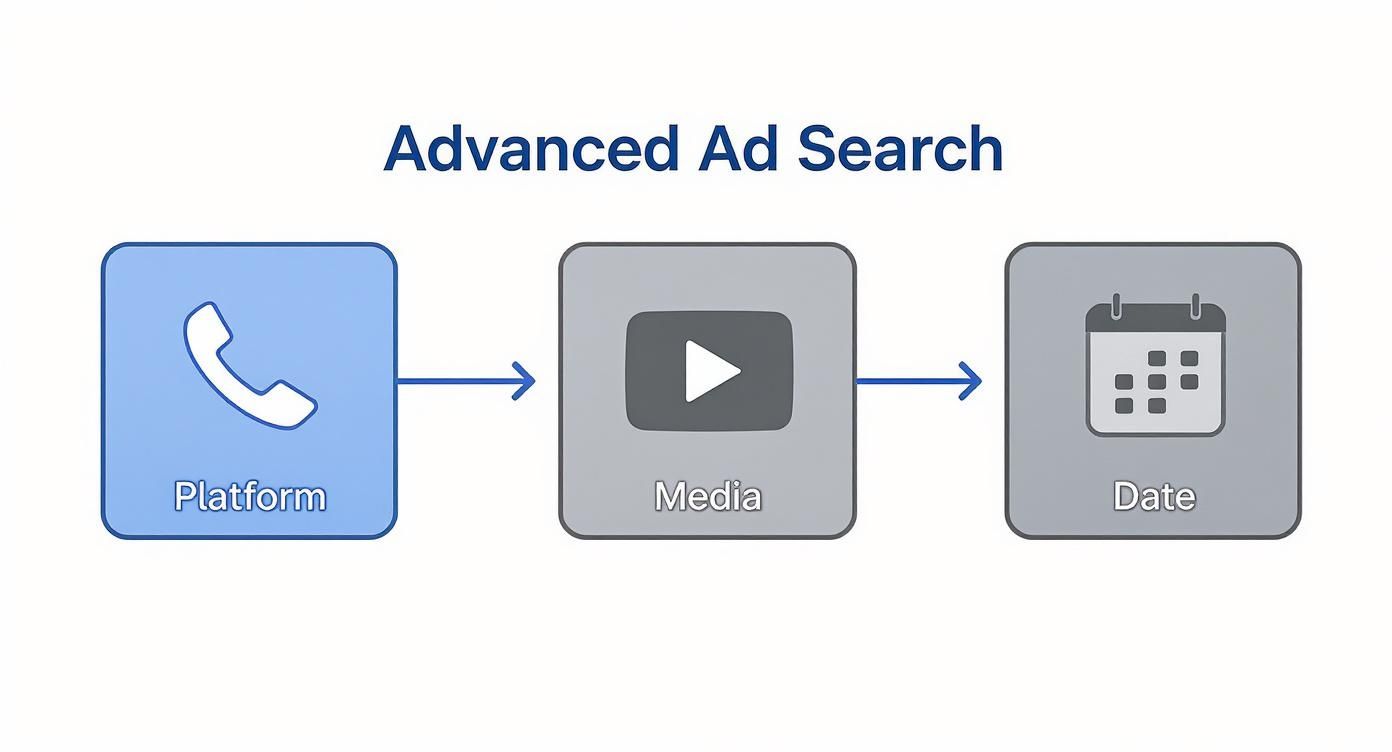
This process shows just how powerful the filters can be. By isolating platform, media type, and date, you can really get under the hood of a specific creative strategy.
Spotting Potential A/B Tests
One of the most valuable tricks you can learn is how to spot a competitor's A/B tests in the wild. And the Ads Library makes it surprisingly simple. All you have to do is look for multiple active ads that are almost identical but have one small, deliberate difference.
When you see two ads with the same image but different headlines, you've likely found a live A/B test. It's like having a direct window into what your competitor is trying to learn about what makes their audience tick.
These small variations could be anything:
- Different Ad Copy: Testing a headline that focuses on benefits versus one that asks a question.
- Varied Visuals: Using the exact same copy but with a different image or video.
- CTA Button Changes: Seeing if "Sign Up" pulls better than "Get Offer."
By paying attention to these tests, you get to learn from their research without spending a dime of your own budget. You can see which marketing campaigns' examples are connecting with the audience you both share.
Inferring Performance from Campaign Longevity
While the Ads Library won't hand you performance metrics like conversion rates on a silver platter, you can still make some pretty solid educated guesses. The key indicator is the "Started running on" date that appears with every ad. If an ad has been running for months, that’s a very strong signal that it’s working. It is likely profitable and delivering a solid return.
On the flip side, ads that pop up and disappear within a week were probably duds. Keep a close eye on which ads your competitors let run for the long haul. These are their "control" ads, the proven winners that they measure all their new tests against. Analyzing these long-running campaigns gives you a blueprint for what works in your market. This is incredibly valuable, especially when you consider Facebook's massive scale. By January 2025, Facebook's ad reach had grown to an incredible 2.28 billion users worldwide, a 4.3% jump from the previous year.
Finding Creative Inspiration for Your Campaigns
We’ve all been there. Staring at a blank screen, waiting for the perfect campaign idea to strike. It’s one of the most frustrating parts of being a marketer. The good news is the Facebook Ads Library isn't just a tool for spying on competitors; it's a massive, searchable database of creative ideas waiting to be discovered.
This isn't about ripping off what other people are doing. It's about understanding what's actually working right now. A few smart searches can help you spot trends, find fresh angles, and turn a creative block into a full-blown brainstorming session.
Analyzing Top Performing Ads in Your Niche
The easiest place to start is with the big players in your own industry. Look up your main competitors and filter their ads to see which ones have been running the longest. If you see a campaign that's been active for 90+ days, that's a huge clue that it's profitable. They wouldn't keep spending money on it otherwise.
As you look through these long-running ads, pay close attention to a few things:
- Headlines and Hooks: What’s the first thing they say? Are they kicking things off with a question, a bold statement, or by poking at a common pain point?
- Creative Style: Are they using polished, professional photos? Or is it all user-generated content and casual videos? The style they lean on tells you a lot about what their audience wants to see.
- Call to Action: Look at the exact words they use. "Shop Now" feels urgent, while "Learn More" is a lower-pressure invitation.
This exercise gives you a solid baseline for what works in your market, straight from the brands who have already spent the money to figure it out.
Looking Beyond Your Industry for Ideas
Sometimes the most brilliant ideas are found outside your own backyard. It’s easy for an entire industry to get stuck in a creative rut, where everyone is saying the same thing in the same way. Peeking into totally different markets can be a game-changer.
For example, a B2B software company could pick up some great tips by seeing how top e-commerce stores use carousel ads to show off different features. A local plumber might get inspired by the way a mobile game uses quick, punchy video ads to show its value in seconds.
Your next breakthrough campaign might not be inspired by a direct competitor. It could come from watching how a fashion brand leverages Instagram Stories or how a food delivery app makes their video ads so irresistible.
Broadening your search exposes you to a much wider world of creative tactics and stops your own ads from becoming stale.
Building Your Own Swipe File
As you explore the facebook/ads/library, don't just browse. You should become a collector. A swipe file is your personal, curated library of fantastic ads that you can turn to anytime you need a spark of inspiration. See an ad with a killer headline, a beautiful visual, or an offer you've never seen before? Screenshot it and save it.
I recommend organizing your swipe file into simple categories that work for you, like:
- Powerful Ad Copy: Examples of headlines and body copy that just work.
- Effective Visuals: Screenshots of eye-catching images and video thumbnails.
- Innovative Formats: Clever uses of carousels, Reels, or collection ads.
- Compelling Offers: Unique discounts, bundles, or free trials that really stand out.
This little habit is incredibly powerful. Instead of starting from zero, you'll have your own personal playbook of proven concepts to jumpstart your brainstorming. If you're ready to go deeper, our guide on crafting a winning ad creative is the perfect next step. Making a habit of collecting and categorizing great ads will sharpen your marketing instincts and ensure you never run out of ideas again.
Making Sense of Ad Spend and Regional Targeting
The Facebook Ads Library is so much more than a treasure trove of creative ideas. If you know what to look for, it can give you some serious clues about a competitor's budget and where in the world they're focused.
While Meta keeps the exact ad spend figures under wraps for most ads, you can still get a feel for a campaign's size and importance. The two biggest tells are the impression data and how long the ad has been running.
Think about it: an ad that's been active for months and is showing up everywhere (Facebook, Instagram, Messenger) points to a hefty investment. It’s a clear signal that the campaign is working and bringing in a positive return. On the flip side, ads that vanish after a week were likely just tests that didn't pan out. This lets you read between the lines to figure out where they're putting their money.
Peeking into Global and Local Playbooks
For businesses with a global footprint, the library is an absolute game-changer for understanding regional marketing. Just by toggling the country filter, you can see exactly how a company tweaks its messaging, visuals, and offers for different cultures. This is invaluable if you're planning your own international expansion.
You might see a global e-commerce brand using loud, high-energy creative in one market and a sleek, minimalist vibe in another. Those little differences offer huge insights into what clicks with local buyers.
Looking at how successful brands adapt their ads from one country to another is like getting a free masterclass in global marketing. It helps you sidestep expensive blunders and enter new markets with a smarter strategy.
This kind of regional deep-dive can directly shape your own budget. If you spot a competitor pouring money into a specific country, it could be a sign of a high-value market you should explore. This is crucial for spending your own ad dollars wisely. By seeing where and how others are succeeding, you can make better decisions about your own ad investments and keep your costs in check. For a closer look at managing these expenses, you can learn more about how to calculate customer acquisition costs with our detailed guide.
This regional analysis really drives home the need for localized strategies. The numbers back it up, too. Facebook's advertising revenue is expected to climb to 156.8 billion** by 2025. North America is the current giant, accounting for over **79 billion, but the Asia-Pacific region is the one to watch. It's the fastest-growing market, jumping 7.1% year-over-year to hit $42.6 billion. These figures show just how much ad spend is spread across the globe, proving that a one-size-fits-all approach just doesn't work. You can discover more insights about these global ad statistics and trends.
Got Questions? We've Got Answers
Diving into a new tool always sparks a few questions. Let's clear up some of the most common ones about the Facebook Ads Library so you can start using it with confidence.
Is the Facebook Ads Library Actually Free?
You bet it is. The Facebook Ads Library is 100% free for anyone to access. You don't even need a Facebook account to start snooping around, which makes it a fantastic resource for marketers, researchers, or just curious consumers.
Does the Library Really Show All the Ads?
Almost, but not quite every single one. While it's incredibly thorough, some ads might not show up because of very specific privacy settings or niche targeting choices. That said, it gives you a massive and remarkably accurate look at the vast majority of active and inactive campaigns.
The whole point of the Ads Library is transparency. A few minor exceptions aside, its job is to pull back the curtain on the ads running across Meta's platforms, especially for sensitive topics like politics or social issues.
Can I See How Well an Ad is Performing?
Nope, you won't find performance stats here. The library doesn't share private data like click-through rates, conversions, or how much money an ad is making. Its focus is strictly on the creative and advertiser information, not the analytics.
However, you can play detective. If you see an ad that's been running for months, that's a pretty solid clue it's working well for the advertiser. Why else would they keep spending money on it?
How Far Back Can I Look?
For ads about social issues, elections, or politics, the archive goes back a full seven years. For regular commercial ads, you can see all active campaigns and a history of inactive ones, which is perfect for tracking a brand's recent advertising history and seeing how their strategy has evolved.
Ready to turn insights into action? Adworkly combines expert strategy with AI-powered tools to help your app achieve explosive growth. Discover how we can optimize your campaigns today.